一、准备工作
准备六台虚拟机,操作系统为Rocky Linux 9.7
再引入一台虚拟机控制集群
| 服务器 |
主机名 |
IP地址 |
| 负载均衡 |
localbalance |
192.168.3.211 |
| web服务器 |
web01 |
192.168.3.212 |
| web服务器 |
web02 |
192.168.3.213 |
| web服务器 |
web03 |
192.168.3.214 |
| 文件服务器 |
nfs |
192.168.3.215 |
| 数据库服务器 |
mysql |
192.168.3.216 |
| new_rockylinux |
localhost |
192.168.3.210 |
将以上虚拟机的ip地址配置好
1
2
3
4
5
6
| #修改ip地址为静态
sudo nmcli con mod "ens160" ipv4.method manual ipv4.addresses "192.168.3.210/24" ipv4.gateway "192.168.3.1" ipv4.dns "223.5.5.5"
#重新加载配置并激活连接(使更改生效)
sudo nmcli con reload
sudo nmcli con down "ens160" && sudo nmcli con up "ens160"
|
new_rockylinux需要完成的准备
1
2
3
4
5
6
7
8
9
10
11
12
13
14
15
16
17
18
19
| 1、安装好expect
2、
[root@localhost ~]# cat /root/local_hosts.txt
root:1:lb
root:1:web01
root:1:web02
root:1:web03
root:1:mysql
root:1:nfs
3、
[root@localhost ~]# cat /etc/hosts
192.168.3.211 lb
192.168.3.212 web01
192.168.3.213 web02
192.168.3.214 web03
192.168.3.215 mysql
192.168.3.216 nfs
|
二、脚本实现
配置完成ip地址之后用xshell进行连接,连接好之后用new_rockylinux写脚本来控制其他六台虚拟机,实现用脚本完成集群的部署
2.1 传密钥给其他六台服务器
1
2
3
4
5
6
7
| [root@localhost ~]# cat /root/local_hosts.txt
root:1:lb
root:1:web01
root:1:web02
root:1:web03
root:1:mysql
root:1:nfs
|
1
2
3
4
5
6
7
8
9
10
11
12
13
14
15
16
17
18
19
20
21
22
23
| # 传密钥给其他六台服务器
function expect_ssh() {
for i in `cat /root/local_hosts.txt`
do
user=$(echo $i|awk -F":" '{print $1}')
pass=$(echo $i|awk -F":" '{print $2}')
ipaddr=$(echo $i|awk -F":" '{print $3}')
expect << EOF
spawn ssh-copy-id $user@$ipaddr
expect {
"yes/no" {send "yes\r";exp_continue}
"password" {send "$pass\r"}
}
expect eof
EOF
done
}
|
2.2 对其他六台服务器进行基础配置
1
2
3
4
5
6
7
8
9
10
11
12
13
14
15
16
17
18
19
20
21
22
23
24
25
26
27
28
29
30
31
32
33
34
35
36
37
38
39
40
41
42
43
44
45
46
47
48
49
50
51
52
53
54
55
56
57
58
59
60
61
62
63
64
65
66
67
68
| function plan() {
for i in `cat /root/local_hosts.txt`
do
ipaddr=$(echo $i|awk -F":" '{print $3}')
echo "==================================================="
echo "=================$ipaddr==========================="
ssh $ipaddr << 'EOF'
# 1. 关闭 SELinux
setenforce 0
sed -i 's/^SELINUX=enforcing/SELINUX=disabled/' /etc/selinux/config
# 2. 停止防火墙
systemctl stop firewalld.service
systemctl disable firewalld.service
# 3. 修改 yum 源为阿里云
sed -e 's|^mirrorlist=|#mirrorlist=|g' \
-e 's|^#baseurl=http://dl.rockylinux.org/\$contentdir|baseurl=https://mirrors.aliyun.com/rockylinux|g' \
-i.bak /etc/yum.repos.d/*.repo
# 4. 更新 yum 缓存和系统
yum clean all
yum makecache
yum update -y
# 5. 安装 bash 补全
dnf install bash-completion -y
# 6. 设置文件描述符限制(完整配置)
echo "* soft nofile 100000" >> /etc/security/limits.conf
echo "* hard nofile 100000" >> /etc/security/limits.conf
echo "root soft nofile 100000" >> /etc/security/limits.conf
echo "root hard nofile 100000" >> /etc/security/limits.conf
# 设置系统级限制
grep -q "fs.file-max" /etc/sysctl.conf || echo "fs.file-max = 1000000" >> /etc/sysctl.conf
grep -q "fs.nr_open" /etc/sysctl.conf || echo "fs.nr_open = 1000000" >> /etc/sysctl.conf
sysctl -p
# 7. 配置 hosts 文件
# 添加新条目
cat >> /etc/hosts << HOSTS_EOF
192.168.3.211 lb
192.168.3.212 web01
192.168.3.213 web02
192.168.3.214 web03
192.168.3.215 mysql
192.168.3.216 nfs
HOSTS_EOF
# 8. 安装常用工具
yum install -y vim wget net-tools lsof telnet
# 9. 验证配置
echo "=== 配置验证 ==="
echo "SELINUX 状态: $(getenforce)"
echo "防火墙状态: $(systemctl is-active firewalld)"
echo "文件描述符软限制: $(ulimit -Sn)"
echo "文件描述符硬限制: $(ulimit -Hn)"
echo "系统文件描述符限制: $(cat /proc/sys/fs/file-max)"
echo "Hosts 配置:"
tail -6 /etc/hosts
EOF
done
}
|
2.3 配置数据库服务器
1
2
3
4
5
6
7
8
9
10
11
12
13
14
15
16
17
18
19
20
21
22
23
24
25
26
27
28
29
30
31
32
33
34
35
36
| function mysql() {
echo "--------------------------------------------"
echo " 开始安装Mysql服务器 "
echo "--------------------------------------------"
ssh $mysql_server <<MYSQL_EOF
yum install mariadb* -y
systemctl start mariadb
systemctl enable mariadb
yum install expect -y
/usr/bin/expect <<EOF
spawn mysql -uroot
expect "MariaDB"
send "grant all on testDB.* to 'lzj'@'192.168.3.%' identified by '123';\r"
expect "MariaDB"
send "flush privileges;\r"
expect "MariaDB"
send "CREATE DATABASE testDB;\r"
expect "MariaDB"
send "USE testDB;\r"
expect "MariaDB"
send "create table messages(id int primary key auto_increment,text varchar(15)) charset=utf8mb4;\r"
expect "MariaDB"
send "quit;\r"
expect eof
EOF
echo "mysql服务器安装和创建完成!"
MYSQL_EOF
}
|
2.4 配置文件服务器
1
2
3
4
5
6
7
8
9
10
11
12
13
14
15
16
17
18
19
20
21
22
23
24
25
26
27
28
29
30
31
32
33
34
35
36
37
38
| function nfs() {
echo "--------------------------------------------"
echo " 开始安装文件服务器 "
echo "--------------------------------------------"
ssh $file_server << EOF
mkdir /data
yum install nfs* -y
systemctl start nfs-server.service
systemctl enable nfs-server.service
echo "/data 192.168.3.0/24(rw,sync,all_squash)" >> /etc/exports
exportfs -a
systemctl restart nfs-server.service
cd /data
yum install git -y
git clone https://gitee.com/egonlin/flask-web-app.git
sed -i -e 's/127.0.0.1/192.168.3.215/' -e 's/xxx/lzj/' /data/flask-web-app/conf/settings.py
cat >> /data/flask-web-app/uwsgi.ini << TXT
[uwsgi]
#1、监听的http协议端口
http = :8080
#2、启动后切换到该目录下作为项目根目录
chdir = /soft/flask-web-app
#3、my_app对应项目根目录下的my_app.py文件,冒号后的app文件内的实例名字
module = my_app:app
#4、启动的工作进程数量
processes = 4
#5、每个进程开启的线程数量
threads = 2
TXT
EOF
echo "文件服务器部署完成"
}
|
2.5 配置web服务器
1
2
3
4
5
6
7
8
9
10
11
12
13
14
15
16
17
18
19
20
21
22
23
24
| function web() {
echo "--------------------------------------------"
echo " 开始安装Web服务器 "
echo "--------------------------------------------"
for j in `echo $web_server`
do
echo "服务器$j开始安装服务"
ssh $j << EOF
yum install gcc* glibc* -y
yum -y install python3 python3-devel python3-pip
pip3 install flask -i https://mirrors.aliyun.com/pypi/simple/
pip3 install pymysql -i https://mirrors.aliyun.com/pypi/simple/
pip3 install uwsgi -i https://mirrors.aliyun.com/pypi/simple/
yum install nfs* -y
mkdir /soft
mount -t nfs 192.168.3.216:/data /soft
echo "nfs:/data /soft nfs defaults 0 0" >>/etc/fstab
echo "服务器$j完成安装服务"
EOF
done
echo "Web服务器配置完成"
}
|
mount -t nfs 192.168.3.216:/data /soft #临时挂载
需要配置永久挂载:
在/etc/fstab文件加入:192.168.3.216:/data /soft nfs defaults 0 0
2.6 配置负载均衡服务器
1
2
3
4
5
6
7
8
9
10
11
12
13
14
15
16
17
18
19
20
21
22
23
24
25
26
27
28
29
30
31
32
33
34
35
| function localbalance() {
echo "--------------------------------------------"
echo " 开始安装负载均衡服务器 "
echo "--------------------------------------------"
ssh $lb_server << EOF
yum install nginx -y
systemctl start nginx
systemctl enable nginx
cp /etc/nginx/nginx.conf /etc/nginx/nginx.conf_bak
cat > /etc/nginx/nginx.conf << 'TXT'
events {
worker_connections 1024;
}
http {
upstream web_app_servers {
server 192.168.3.212:8080 weight=1;
server 192.168.3.213:8080 weight=1;
server 192.168.3.214:8080 weight=1;
# 默认使用加权轮询(weighted round-robin)
# 三台服务器权重相同(weight=1),请求将平均分配
# 请求分配比例:1:1:1
}
server {
listen 80;
location / {
proxy_pass http://web_app_servers;
}
}
}
TXT
systemctl restart nginx
EOF
}
|
三、搭建完成
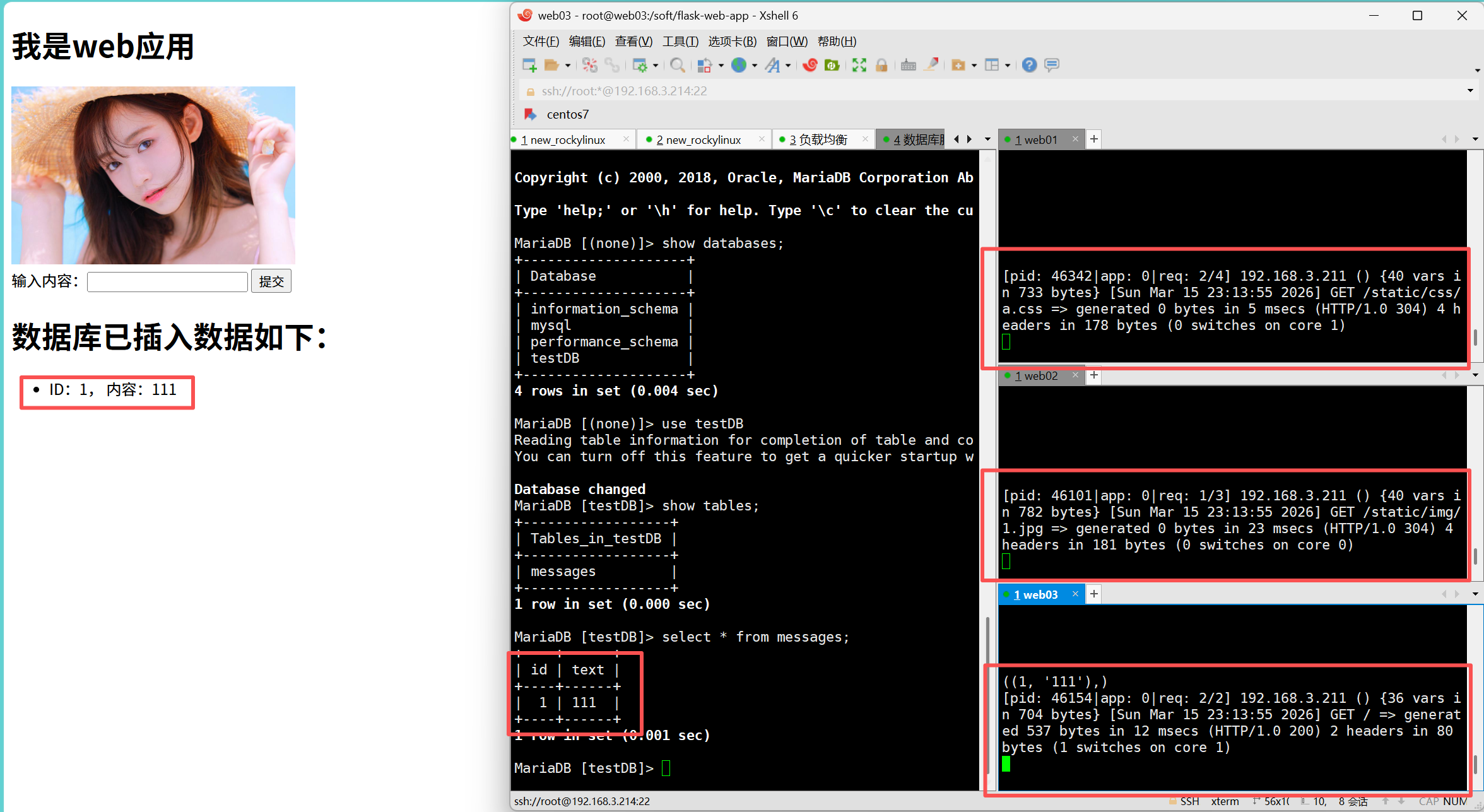
完整脚本
1
2
3
4
5
6
7
8
9
10
11
12
13
14
15
16
17
18
19
20
21
22
23
24
25
26
27
28
29
30
31
32
33
34
35
36
37
38
39
40
41
42
43
44
45
46
47
48
49
50
51
52
53
54
55
56
57
58
59
60
61
62
63
64
65
66
67
68
69
70
71
72
73
74
75
76
77
78
79
80
81
82
83
84
85
86
87
88
89
90
91
92
93
94
95
96
97
98
99
100
101
102
103
104
105
106
107
108
109
110
111
112
113
114
115
116
117
118
119
120
121
122
123
124
125
126
127
128
129
130
131
132
133
134
135
136
137
138
139
140
141
142
143
144
145
146
147
148
149
150
151
152
153
154
155
156
157
158
159
160
161
162
163
164
165
166
167
168
169
170
171
172
173
174
175
176
177
178
179
180
181
182
183
184
185
186
187
188
189
190
191
192
193
194
195
196
197
198
199
200
201
202
203
204
205
206
207
208
209
210
211
212
213
214
215
216
217
218
219
220
221
222
223
224
225
226
227
228
229
230
231
232
233
234
235
236
237
238
239
240
241
242
243
244
245
246
247
248
| [root@localhost ~]# cat yczk.sh
#!/usr/bin/bash
mysql_server="mysql"
file_server="nfs"
web_server="web01 web02 web03"
lb_server="lb"
# 传密钥给其他六台服务器
function expect_ssh() {
    for i in `cat /root/local_hosts.txt`
    do
    user=$(echo $i|awk -F":" '{print $1}')
    pass=$(echo $i|awk -F":" '{print $2}')
    ipaddr=$(echo $i|awk -F":" '{print $3}')

expect << EOF

spawn ssh-copy-id  $user@$ipaddr

expect {
    "yes/no" {send "yes\r";exp_continue}
    "password" {send "$pass\r"}
}

    expect eof

EOF

    done
}
function plan() {
for i in `cat /root/local_hosts.txt`
do
ipaddr=$(echo $i|awk -F":" '{print $3}')
echo -e "\033[31m===================================================\033[0m]"
echo -e "\033[31m| $ipaddr |\033[0m]"
echo -e "\033[31m================配置基础服务=========================\033[0m]"
ssh $ipaddr << 'EOF'
# 1. 关闭 SELinux
setenforce 0
sed -i 's/^SELINUX=enforcing/SELINUX=disabled/' /etc/selinux/config
# 2. 停止防火墙
systemctl stop firewalld.service
systemctl disable firewalld.service
# 3. 修改 yum 源为阿里云
sed -e 's|^mirrorlist=|#mirrorlist=|g' \
-e 's|^#baseurl=http://dl.rockylinux.org/\$contentdir|baseurl=https://mirrors.aliyun.com/rockylinux|g' \
-i.bak /etc/yum.repos.d/*.repo
# 4. 更新 yum 缓存和系统(修正拼写错误)
yum clean all
yum makecache
yum update -y
# 5. 安装 bash 补全
dnf install bash-completion -y
# 6. 设置文件描述符限制(完整配置)
echo "* soft nofile 100000" >> /etc/security/limits.conf
echo "* hard nofile 100000" >> /etc/security/limits.conf
echo "root soft nofile 100000" >> /etc/security/limits.conf
echo "root hard nofile 100000" >> /etc/security/limits.conf
# 设置系统级限制
grep -q "fs.file-max" /etc/sysctl.conf || echo "fs.file-max = 1000000" >> /etc/sysctl.conf
grep -q "fs.nr_open" /etc/sysctl.conf || echo "fs.nr_open = 1000000" >> /etc/sysctl.conf
sysctl -p
# 7. 配置 hosts 文件
# 添加新条目
cat >> /etc/hosts << HOSTS_EOF
192.168.3.211 lb
192.168.3.212 web01
192.168.3.213 web02
192.168.3.214 web03
192.168.3.215 mysql
192.168.3.216 nfs
HOSTS_EOF
# 8. 安装常用工具(可选)
yum install -y vim wget net-tools lsof telnet
# 9. 验证配置
echo "=== 配置验证 ==="
echo "SELINUX 状态: $(getenforce)"
echo "防火墙状态: $(systemctl is-active firewalld)"
echo "文件描述符软限制: $(ulimit -Sn)"
echo "文件描述符硬限制: $(ulimit -Hn)"
echo "系统文件描述符限制: $(cat /proc/sys/fs/file-max)"
echo "Hosts 配置:"
tail -6 /etc/hosts
EOF
echo "$ipaddr基础配置完成"
done
}
function mysql() {
    echo "--------------------------------------------"
    echo "            开始安装Mysql服务器             "
    echo "--------------------------------------------"
    ssh $mysql_server <<MYSQL_EOF
        yum install mariadb* -y
        systemctl start mariadb
        systemctl enable mariadb
        yum install expect -y
        /usr/bin/expect <<EOF
            spawn mysql -uroot

            expect "MariaDB"
            send "grant all on testDB.* to 'lzj'@'192.168.3.%' identified by '123';\r"

            expect "MariaDB"
            send "flush privileges;\r"

            expect "MariaDB"
            send "CREATE DATABASE testDB;\r"

            expect "MariaDB"
            send "USE testDB;\r"

            expect "MariaDB"
            send "create table messages(id int primary key auto_increment,text varchar(15)) charset=utf8mb4;\r"

        expect "MariaDB"
            send "quit;\r"

            expect eof
EOF
echo "mysql服务器安装和创建完成!"
MYSQL_EOF

}
function nfs() {
    echo "--------------------------------------------"
    echo "            开始安装文件服务器             "
    echo "--------------------------------------------"
    ssh $file_server << EOF
    mkdir /data
    yum install nfs* -y
    systemctl start nfs-server.service
    systemctl enable nfs-server.service
    echo "/data 192.168.3.0/24(rw,sync,all_squash)" >> /etc/exports
    exportfs -a
    systemctl restart nfs-server.service
    cd /data
    yum install git -y
    git clone https://gitee.com/egonlin/flask-web-app.git
    sed -i -e 's/127.0.0.1/192.168.3.215/' -e 's/xxx/lzj/' /data/flask-web-app/conf/settings.py
    cat >> /data/flask-web-app/uwsgi.ini << TXT
[uwsgi]
#1、监听的http协议端口
http = :8080

#2、启动后切换到该目录下作为项目根目录
chdir = /soft/flask-web-app

#3、my_app对应项目根目录下的my_app.py文件,冒号后的app文件内的实例名字
module = my_app:app

#4、启动的工作进程数量
processes = 4

#5、每个进程开启的线程数量
threads = 2
TXT

EOF
    echo "文件服务器部署完成"

}
function web() {
echo "--------------------------------------------"
echo " 开始安装Web服务器 "
echo "--------------------------------------------"
for j in `echo $web_server`
do
echo "服务器$j开始安装服务"
ssh $j << EOF
yum install gcc* glibc* -y
yum -y install python3 python3-devel python3-pip
pip3 install flask -i https://mirrors.aliyun.com/pypi/simple/
pip3 install pymysql -i https://mirrors.aliyun.com/pypi/simple/
pip3 install uwsgi -i https://mirrors.aliyun.com/pypi/simple/
yum install nfs* -y
mkdir /soft
mount -t nfs 192.168.3.216:/data /soft
echo "服务器$j完成安装服务"
EOF
done
echo "Web服务器配置完成"
}
function localbalance() {
echo "--------------------------------------------"
echo " 开始安装负载均衡服务器 "
echo "--------------------------------------------"
ssh $lb_server << EOF
yum install nginx -y
systemctl start nginx
systemctl enable nginx
cp /etc/nginx/nginx.conf /etc/nginx/nginx.conf_bak
cat > /etc/nginx/nginx.conf << 'TXT'
events {
worker_connections 1024;
}
http {
upstream web_app_servers {
server 192.168.3.212:8080 weight=1;
server 192.168.3.213:8080 weight=1;
server 192.168.3.214:8080 weight=1;
# 默认使用加权轮询(weighted round-robin)
# 三台服务器权重相同(weight=1),请求将平均分配
# 请求分配比例:1:1:1
}
server {
listen 80;
location / {
proxy_pass http://web_app_servers;
}
}
}
TXT
systemctl restart nginx
EOF
echo "负载均衡服务器配置完成"
}
expect_ssh
plan
mysql
nfs
web
localbalance
|